Why Your Website Is Slow, and 6 Fixes You Can Do Today
A slow website loses visitors before they see anything. These six fixes need no coding and solve the most common causes.

Most people leave a website that takes more than a few seconds to load on their phone. Google notices too: speed is part of how it ranks pages. The good news is that most small business sites are slow for the same handful of reasons, and you can fix most of them without touching code.
First, measure it
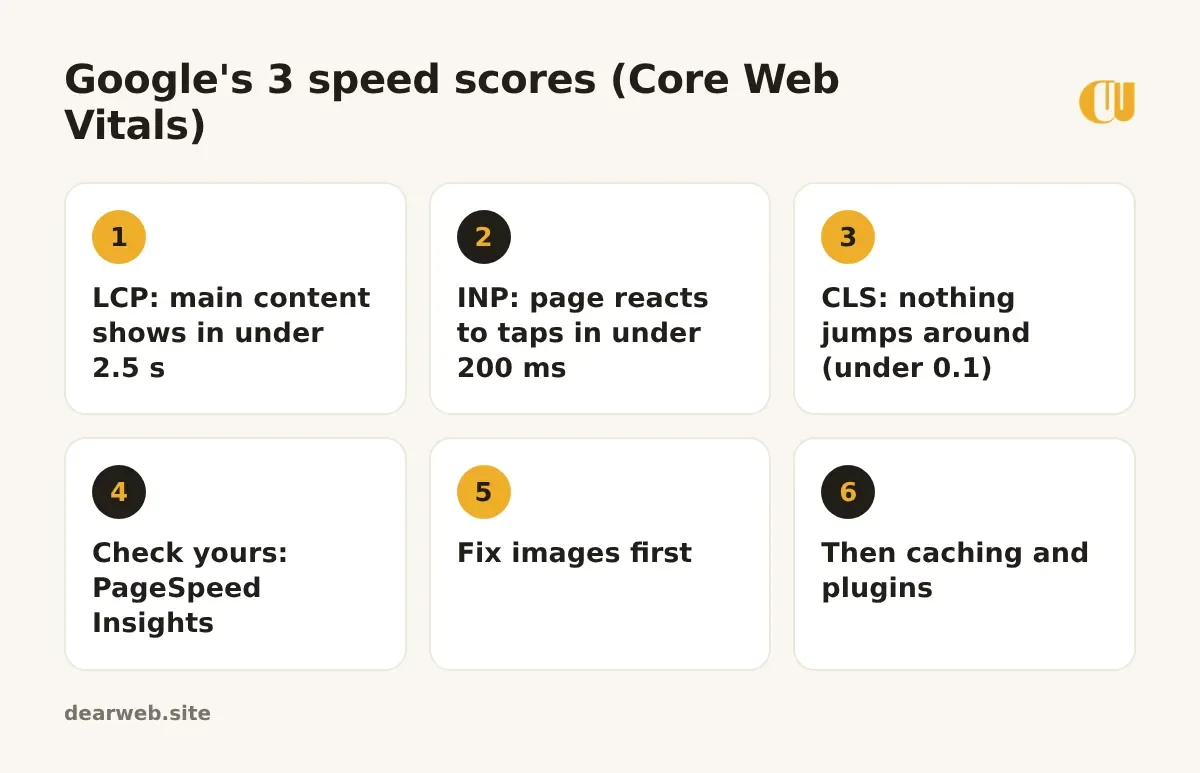
Open PageSpeed Insights, type your address and look at the mobile result. Google judges speed with three scores, called Core Web Vitals:
Fix 1: shrink your images
Photos from a phone are often 3 to 6 MB each. A homepage with a few of them can weigh more than a whole app. Resize photos to about 1600 pixels wide and compress them; aim for under 200 KB each. WebP files are usually much smaller than JPG at the same quality.
Fix 2: turn on caching
Caching saves a ready-made copy of each page so your server doesn't build it from scratch for every visitor. On WordPress with LiteSpeed hosting, install LiteSpeed Cache; otherwise ask your host what they recommend.
Fix 3: remove plugins you don't need
Every plugin can add scripts and styles to every page. Sliders, social media feeds and popups are common culprits. Deactivate one at a time and re-test your speed.
Fix 4: don't autoplay videos from your own hosting
Upload videos to YouTube and show a thumbnail that loads the player only when clicked. Background videos look nice but are heavy on mobile data.
Fix 5: use fewer fonts
Each font weight is another file to download. Two fonts with two or three weights each is plenty for a business site.
Fix 6: check your hosting
If your site is still slow after the fixes above, the server may be the problem. Very cheap or overcrowded hosting slows every page. Ask your host whether you're on LiteSpeed or NGINX, whether PHP is a recent version (8.1 or newer), and whether your plan has enough resources.
Start with images: on most of the small business sites we check, they're the biggest single cause of slow pages.
Want to know how your site does right now? The free website audit shows your page size and load time, and the image compressor shrinks your photos in the browser without uploading them anywhere.